

A quick, practical way for P&C agency owners to tame inbox overload using ChatGPT’s native email integration.
Your inbox is where renewals hide, billing notices get buried, and client questions quietly age into tomorrow’s headache. Most agency owners don’t need another system; they need something that cuts through the noise fast.
This workflow gives you exactly that: a lightweight, daily triage process powered by ChatGPT. No special setup. No custom automations. Just your inbox, ChatGPT, and a simple routine you can run in seconds.
Ingredients
- ChatGPT Account – 1 login
- Email Account (Gmail or Outlook) – 1 login
- Native Email Integration Enabled
- Unread Emails – the more honest you are with yourself, the better
- One simple chat prompt – your trigger for instant clarity
Prep Time
- 2 minutes to connect your inbox
- 10 seconds per triage
- Zero minutes of training required
Step-by-Step Instructions
1. Connect your inbox to ChatGPT
This is the only setup step (think of it as cutting your ingredients before cooking).
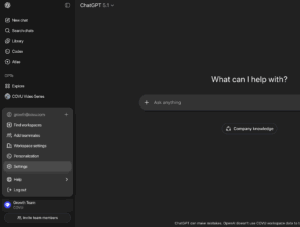
- Open ChatGPT Settings
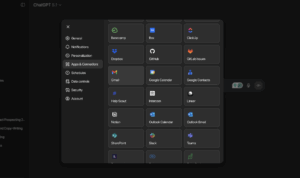
- Go to Apps and Connectors
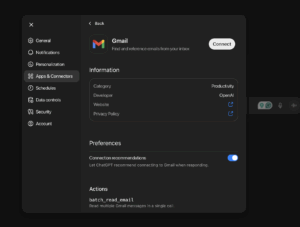
- Choose Gmail or Outlook
- Approve access
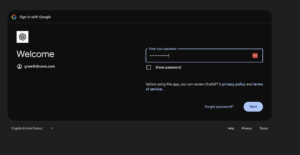
Once connected, ChatGPT can read, summarize, and organize your emails only when you ask it to.
2. Run a quick connection test
In the chat, type:
“Show me my unread emails.”
If everything is connected correctly, ChatGPT pulls them in instantly.
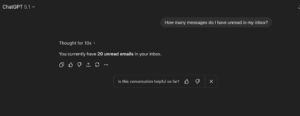
If not, you’ll know right away.
3. Start your daily inbox triage
This is your go-to routine: simple, fast, and actually useful.
Ask ChatGPT for anything you need on the fly:
- “Summarize all unread emails from today.”
- “Group my new emails into renewal, billing, claims, and service requests.”
- “Search my inbox for anything from Progressive.”
- “Draft a reply to the third unread message.”
- “Label that email as ‘Claims’ and archive it.”
ChatGPT handles the grunt work.
You make the decisions.
No tabs. No overwhelm.
4. Use quick prompts when things pile up
When the inbox starts to feel heavy, try:
- “Give me a digest of anything new in the last 2 hours.”
- “Find all emails that mention ‘COI’.”
- “What unread items need follow-up today?”
- “Read the latest client email and suggest a reply.”
This becomes your on-demand cleanup cycle — a way to stay sharp without living in your inbox.
5. Make it a simple daily rhythm
The best workflows aren’t complicated. They’re consistent.
Try this three-touch system:
- Morning: “Summarize all overnight emails.”
- Midday: “What’s new since I last checked?”
- End-of-day: “Anything still waiting on me?”
Three prompts.
Five minutes.
A calmer inbox.
Who This Serves
Any agency owner or CSR who’s tired of spending half their day sorting, scanning, and reacting to emails — and wants a simple, reliable way to stay ahead without hiring another set of hands.